Create an account
How to create an account in the MyTV.global website builder
Push the button "Start earning money" and go to the page where you may choose to select a hosting plan.
We give you not only a website. We give you easy secure cloud hosting.
Thanks to our cloud hosting, your website will be available 24/7 for visitors to the network. Hosting is a paid service. The information that will be posted on the website will be stored on our safe cloud server. Our task is to make your website available to users around the clock.
The advantages of our server, are our security guarantee, high speed, favorable tariff plans, and technical support services. When ordering a server from us, you can always count on the help of technical operational support 24/7. We offer our customers a quality guarantee and affordable prices for high-quality and reliable hosting.
Enter the promotional code by choosing a hosting plan if you have one.
How to choose the best plan for you
The plan that you need depends on the server space you need monthly.
How to administrate your website in the MyTV.global website builder
When you create an account you'll take a DASHBOARD with some categories:
My cabinet
here it is possible to track the overall statistics of views for the last 30 days for the website and for each page separately. As well as the overall statistics of the channel for the entire period for each page separately, which makes it possible to understand what content is of interest to the user. Also, the ability to track the number of views videos, and total ad revenue.
You may see in real-time the information here:
- Amount of used hard disk space and remaining GB
- General channel statistics for the last 30 days
- General statistics of the channel for all time
In the statistics section of our constructor MyTv.global,
Pages
where you may see your website structure
Administrate
where you may manage your website settings.

How to manage your website settings
Your website TITLE and DOMAIN
We give you a free subdomain "yourwebsite.mytv.global".
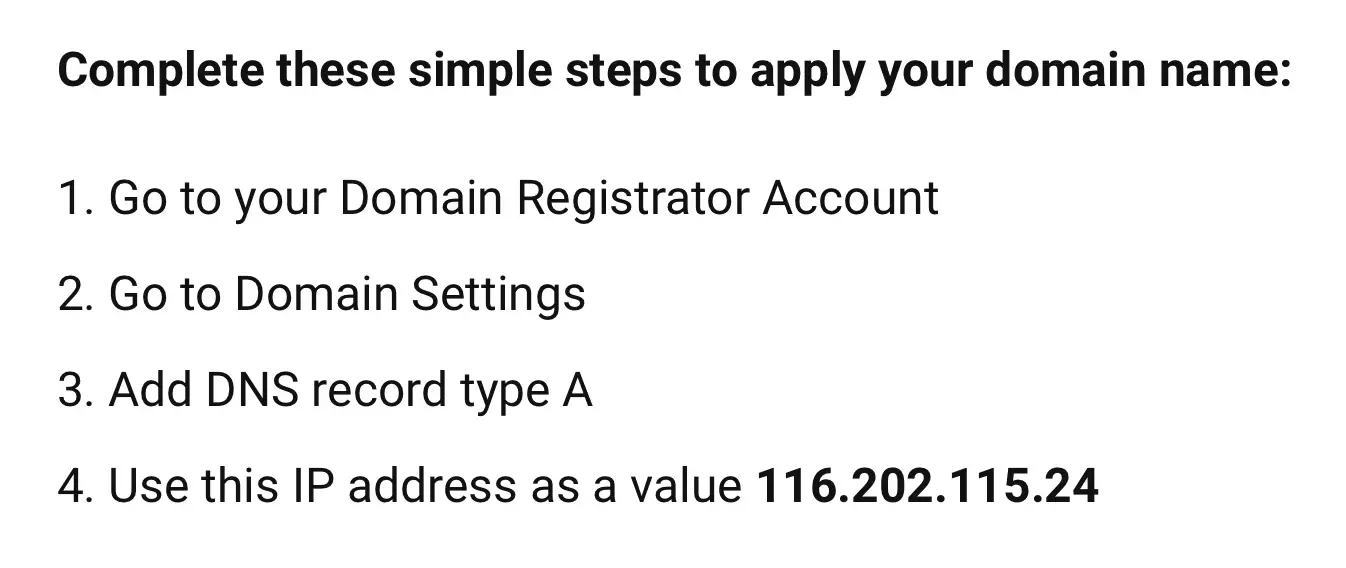
Or you may use your own domain easily and ai is for free too.
You need to think carefully about the name and domain name since changing the website name is tantamount to creating a new website and losing old users.
Your website LANGUAGES
Every website is multi-language.
Choose the language in which the website will be displayed primarily. In the future you can create a multilingual website, which will lead to an increase in resource traffic, and will expand the target audience.
Your website CONTACTS
We add social networks in the footer for display and contacts for quick feedback. Special fields for contacts and social media appear in the footer automatically.
ANALYTICS
Your ANALYTICS code field
How to customize your website design
The website design is the first thing that a potential client sees. Therefore, the appearance of the website plays an important role. A pleasant and interesting look of the site attracts user is very important in the process of its promotion and promotion. You need to clearly understand what the ideal website should look like in the client's niche, who is the target audience and what tasks the site faces.
With the help of our MyTV.global website builder, you can make the website look impressive with the help of the colorful range of the site that you choose yourself. Website design is a fun process, so you can create and inspire the look and feel of your website using our in-house algorithms.
You may choose the primary color of your website and the MyTV.global website builder
We have algorithms inside that select the color scheme of your website depending on the color that you have chosen as the main one.
All you have to do is choose the main color of your website and MyTV.global website builder algorithms will build a harmonious modern color palette for your site for you.
you may download the website logo in the DESIGN section. The file must be in JPG, PNG, SVG, and 200KB format.
How to manage your website users
There are 4 levels of users on MyTV.global website builder:
- owner
- editor
- author
- reader
The website owner is the person or organization that owns the domain.
The website editors are persons who manage authors and edited their posts.
The author writes articles, press releases, news, service descriptions, headlines, and all text.
How to manage your website subscription
Every reader has an opportunity to subscribe to your news.
The NEWSLETTER section allows you to enable a newsletter subscription form, the user will receive an email notification about updates to your website.
You may turn on the built-in subscription form to allow the readers to be with you as often as you write new posts.
Share:


